These two weeks, we learnt how to plan a new system in an organization.
How to plan a new system
People need a process of thinking to develop a new system. It means to think about those details and actions to achieve the goal. This include investigating the existing problems and advantages of current systems, needs from people working with it or using it. People usually use observation to determine the needs, which includes survey, interview, direct observation and looking at the documents.
There are several things to notice when planning. First is what can be used from the existing system, so that the organization and save some budget. The new systems can also leads to ethical problems, like unemployment. Finally, people may need retraining, which is a time-consuming and tedious process.
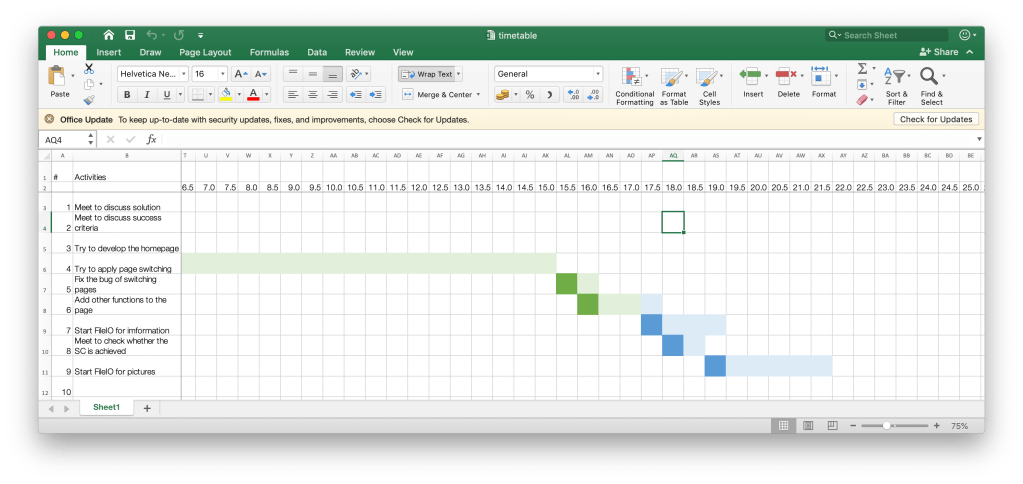
To effectively plan a new system, people can use several methods. The first one is the Gantt chart. It uses bars to represent the predicted time and actual time to finish each step of a task. For example, we can use Gantt chart to plan and monitor our IA progress, so that we can hand them in on time.
Need of changing management
Some times, there could be a structural change of stakeholders, so that people need to change the way of managing systems.
There are several factors to consider when changing management.
Timeframe. This means how long and how many process will the change take. People can use Gantt chart to do this.
Testing. Before actually implement, people need to test the new system and potential problems, like system bugs and data loss.
Training. This can be a tedious and ineffective process, so managers need to make sure all the stuff is efficiently trained.
How to implement.
Types of changeover. There are four types of changeovers, which are: direct (without any transition), parallel (new and old system run at the same time), pilot (a small group of people try the new system first and then other people) and phased (functions move parts by parts).
Direct changeover needs minimal time and effort and is available immediately, but has no backup. Parallel changeover means the old system can still run if the new one fails, and the results can be compared. However, it is costly in money and time. Pilot means all features can be fully trailed, and only a small part would suffer if the new one failed. People can also train each other, but it may have no backup. Phased means users can get used to it slowly, so training is convenient. It moves from module to module, so if one module fail, it can be a problem. Some modules are connected together, so users may feel inconvenient during the changeover. For example, our website from ManageBac to engage is a direct system. It would cost us a few weeks to get use to the new system. However, it is quick to implement, so that teachers can directly use it without any delay. If we use parallel, it may increase the work of teachers. If we use pilot, there might be problem with the leading students, and increase the work of teachers as well.
Legacy system and business merger
A legacy system refers to an old, technology, hardware, computer system, or application program that cannot be converted or ungraded into a newer format. It is abandoned because it’s so old that it’s difficult to find people with knowledge to maintain it. For example, flash, an old video technology that is not safe and fast enough now, cannot be undated into newer format, like HTML5. Overtime, there will be less people know how to use flash, then it will be given up.
Business merger, on the other hand, means the combining of two companies to reduce cost. There are four ways to deal with the existed systems: pick the best parts of each one, choose the best system, keep both or use a completely new one.
Business merger can cause problems like language differences and unemployment.
An example of business merger is Microsoft and Nokia’s smart phone service.
On-premises and SaaS
Two types of cloud computing are on-premises and SaaS (software as a service).
On-premises means all functions are managed by the clients themselves, including applications, data, runtime, middleware, O/S, virtualization, servers, storage and networking. Data are stored in local servers, so it runs faster and more safely. However, extra people are needed to maintain the stability of the whole system.
SaaS, on the other hand, means that all functions are provided by the server. The software manufacturers maintain and manage the software infrastructures. It’s ready-to-use, faster to implement, lower at cost. It does not need to hire extra people to maintain. When clients have problems, the technicians from the software manufacturers can solve the problems. However there could be problems with security, time zone (which prevent effective feedback from technicians), and need to internet connection.
Data migration
Data migration refers to the transfer of databetween different formats, storage types and computer systems. It’s usually done automatically. There are three steps of migration.
The first step is planning. People determines the requirements of this process. People need to consider the future environment of those data.
The second one is migration. Technicians will tell their plans, obtain, install and configure any necessary software and hardware, and proceed to the data migration.
The third one is validation. It check whether the new data is the same as the old data.
Data validation tests whether the data is within predefined limits or follow certain specifications. Data verification tests the correctness of user input. This is usually done by requiring the users to input the data twice.
There might be data loss during the process. Other problems like data incompatibility may occur as well.
Data loss
Data loss means the loss of data due to system failure, storage negligence, or even transmission or processing errors.
Causes of data loss can be power out, defect hard-drives, system crashes and malicious activities. For example, if user drop their computer to the ground like Annie does, the disk of the computer may be broken and cause data loss. Data loss may lead to system disruptions, loss revenue or competitive advantage for businesses (data leaks), loss of brand image/trust by customers, legal liability to clients; suppliers and employees, high cost of data restoration in both money and effort, and the risk of unable to recover the lost data. It may even harm the life of people if the medical record is lost.
In a class activity, we talked about how to prevent data loss. Some solutions are add “try and catch” in the program so that when a lost happen, it wouldn’t cause further problem will alert the programmers. Another way is to pay attention to all the warning signs of the program and fix them before they turn into worse errors.
 JIHONG ZHAO