Structure of Network
This week, we learnt about the principles of networking.
Computer network is a series of computing devices connected together to communicate and share resources, like the capability of calculating and files. There are two types of network connection: through wires or wireless. A computer could have several roles in a network: a client, a server (like firewall), or a router.
Entities
A network needs several entities to work.
Router is like the Brian of the network. It detects the IP address of devices, and sent and receive tons of information between devices.
Switch is
Server is a power machine that provide services, like storages and computing power.
Client is the computer or device that receive information from server.
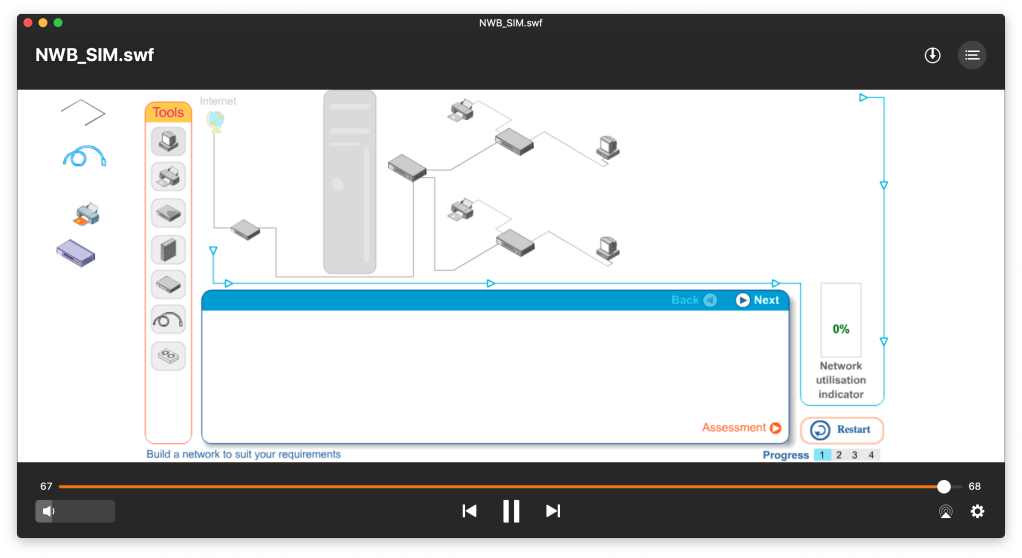
After learning the structures and components in a network, we built a virtual network on a flash program to have a direct look at the structure of a network.
DNS
Domain Name System (DNS) means that each webpage has an address, and DNS describes the process of how our browser get and display the webpages.
When user input the domain name into the browser, the resolver in the OS will read it and transmit it to the DNS. DNS will then convert the name into an IP address that the machines could understand. Now the browser has the IP, so it could set a “http get” command to the web server, while the web server in the organization/company will return the HTML data stream back. Finally, the browser could render the HTML data and present information for humans to read.
Different Networks
There are several types of networks.
LAN (local area network) is a network that connects a small number of machines that are closed to each other. It usually use a client-server mode.
WLAN (wireless local area network) is similar to LAN, but data is transferred without wires.
VLAN (virtual local area network), on the contrary, is a virtual version of LAN. It means grouping a series of machines that are not physically connected, but through the connection of internet, pretending that they are close to each other so that they can share resources. They are connected through a switch and a router.
Managing a LAN is easier, but VLAN perform better, is safer and has better flexibility, and it’s not subject to physical location.
PAN (personal area network) in the network between personal devices, like one’s computer, phone and printer.
WAN (wide area network) is a network that connects local-area networks from a larger region, even internationally. It used leased communication line, which is expensive but just for personal use.
MAN (metropolitan area network) refers to the network that covers a city.
Internet is a world-wide network that connect everyone.
Extranet is a world-wide network that for private use.
Network Topology
There are three kinds of network topology, which means the way to distribute networks.
Ring topology is a ring with only one direction, and each node (machine or computer) on the ring is like a repeater or booster of network. If one of them get broken, the whole system will collapse.
Star topology has a centrally located hub or locator and several branches. The switch collects and distributes the flow of data in the network. Switch could transfer data to only one receiver, but hub could only transfer to all machines.
Bus topology contains a single communication line but with double directions. It’s difficult to troubleshoot because there is no center.
Then we did another activity simulating the process of sending and receiving data. If the data is received, the receiver will send a confirmation message back to let the sender know; else the sender will try to send again. In the activity, I was a sender; the carriers of packets may decide whether the packets are lost or sent. If the packets are successfully sent, the receiver will send me a message back.
 JIHONG ZHAO